Built for experts

Work with slides like it's 2026.

Editing slides by hand isn't worthy of human time anymore.

PowerSlide is your clever AI associate inside PowerPoint that has full editing capabilities. It lets you focus on the content and the story, while it handles the grunt work, pulling in reference decks, data sources, skills and more to make your slides look exactly how you want them to.

Free trial credits on sign-up. No credit card. Cancel anytime.

See it in action

Example 1 of 16

IC memo in 90 minutes

Partner-ready investment-committee memo from a model, diligence notes, and a brand template — built in the open deck.

We present to IC in 90 minutes. Build an investment committee memo deck using the attached sample deck and data. Use a minimalist black and white theme

Built an 8-slide IC memo in the open deck from your model and diligence notes — black-and-white, pyramid structure, numbers only from the files.

What's in the deck

  • Recommendation and ask up front
  • ARR bridge and unit economics from model.xlsx
  • Thesis, risks, and returns grounded in the diligence pack
  • Action titles throughout; sources tied to the attachments

Flip through the after deck and say what you want tightened before the room.

Before

  • Before slides 1

After

  • After slides 1
  • After slides 2
  • After slides 3
  • After slides 4
  • After slides 5
  • After slides 6
  • After slides 7
  • After slides 8
  • After slides 9
  • After slides 10
  • After slides 11
  • After slides 12
  • After slides 1
  • After slides 2
  • After slides 3
  • After slides 4
  • After slides 5
  • After slides 6
  • After slides 7
  • After slides 8
  • After slides 9
  • After slides 10
  • After slides 11
  • After slides 12

Generated with PowerSlide

Design System

  • Design System slides 1
  • Design System slides 2
  • Design System slides 3
  • Design System slides 4
  • Design System slides 5
  • Design System slides 1
  • Design System slides 2
  • Design System slides 3
  • Design System slides 4
  • Design System slides 5

1 / 5

Resolve comments on a slide

Sticky review notes in, cleaned slide out — storyline intact.

Resolve the comments on this slide. Apply the feedback, keep the storyline intact, and leave the slide partner-ready.

Worked through the comments on this slide and kept the storyline intact.

Resolved

  • Applied the feedback on title, evidence, and wording
  • Left the slide partner-ready — no orphaned callouts

Open the after slide to review. Say if any comment should stay open or get a different fix.

Before

  • Before slides 1

After

  • After slides 1

Meeting recording → decision slides

Drop a client-sync MP4 — get decisions, owners, and open questions into the open deck.

I recorded our client sync (attached). Transcribe the meeting and turn it into slides: decisions made, owners, deadlines, and open questions. Keep it short — partner-ready, not a verbatim dump.

Pulled the transcript from meeting.mp4 and built a short decision deck in the open file.

Slides

  1. Decisions — what was agreed, with owners
  2. Actions & dates — only items with a clear next step
  3. Open questions — parked for the follow-up, not buried in prose

I skipped small talk and repeated debates. Want speaker notes keyed to who said what, or a one-pager email recap from the same transcript?

Summarize the storyline

Get the pyramid in one glance — governing thought, supporting points, and gaps — without flipping the whole deck.

Summarize the storyline of this deck. Give me the governing thought, the key supporting points in order, and call out any slides that don't earn their place.

Here's the storyline as it reads today:

Governing thought
Recommend proceeding with the Series A at the proposed terms — growth and unit economics support the ask.

Spine

  1. Situation — market and product traction
  2. Complication — competitive pressure and CAC rising in segment B
  3. Answer — raise to fund GTM in A/B, hold C
  4. Proof — ARR bridge, NRR, cohort payback
  5. Risks & ask — concentration + hiring plan; $8M for 18 months runway

Soft spots

  • Slide 6 restates slide 3 without new evidence
  • Risks land late — consider pulling ahead of the ask

Want me to rewrite the action titles to match this spine, or cut slide 6?

Generated with PowerSlide

Ketchup

  • Ketchup slides 1
  • Ketchup slides 2
  • Ketchup slides 3
  • Ketchup slides 4
  • Ketchup slides 5
  • Ketchup slides 6
  • Ketchup slides 7
  • Ketchup slides 8
  • Ketchup slides 9
  • Ketchup slides 10
  • Ketchup slides 11
  • Ketchup slides 12
  • Ketchup slides 1
  • Ketchup slides 2
  • Ketchup slides 3
  • Ketchup slides 4
  • Ketchup slides 5
  • Ketchup slides 6
  • Ketchup slides 7
  • Ketchup slides 8
  • Ketchup slides 9
  • Ketchup slides 10
  • Ketchup slides 11
  • Ketchup slides 12

1 / 12

Grill this slide

A tough partner review — weak claims, missing sources, and title so-whats called out.

Grill this slide like a skeptical partner. Challenge the title, the evidence, and anything that wouldn't survive Q&A. Be specific — quote the weak lines.

Partner grill on this slide:

  1. Title is a topic, not a so-what — "Q3 overview" doesn't tell me what changed. Lead with the conclusion.
  2. "Strong growth" — vs what baseline? Put the % and the period on the slide.
  3. Missing source on the market-size callout — I wouldn't show that in IC without a footnote.
  4. Chart and title disagree — title implies acceleration; series is flattish after Q2.

Want me to apply fixes for 1–3 now, or only rewrite the title?

Draft speaker notes

Talking points under each slide — what to say, what not to open up.

Draft concise speaker notes for every slide. 2–4 bullets per slide: the point to hit, one proof, and what not to volunteer in Q&A.

Added speaker notes across the deck.

Per slide

  • Opening line (the so-what)
  • One proof point to say out loud
  • A "don't open" note for risky tangents

Notes are in the PowerPoint notes pane — not on the slides. Want a one-page leave-behind outline as well?

Anonymize for external share

Strip client names and identifiers before the deck leaves the building.

Anonymize this deck for external sharing. Replace client names, employee names, and any other identifying details with clear placeholders. Keep the story and numbers intact.

Anonymized the deck for external share.

Replaced

  • Client and employee names → placeholders (e.g. Client A, Partner 1)
  • Emails, office locations, and other identifiers where they appeared
  • Storyline and quantitative claims left as-is

I left industry and market figures untouched. Want a second pass for logos or screenshot redaction?

Generated with PowerSlide

Amazon

  • Amazon slides 1
  • Amazon slides 2
  • Amazon slides 3
  • Amazon slides 4
  • Amazon slides 5
  • Amazon slides 6
  • Amazon slides 7
  • Amazon slides 8
  • Amazon slides 9
  • Amazon slides 1
  • Amazon slides 2
  • Amazon slides 3
  • Amazon slides 4
  • Amazon slides 5
  • Amazon slides 6
  • Amazon slides 7
  • Amazon slides 8
  • Amazon slides 9

1 / 9

Exec summary from a long report

Drop a 500-page PDF — get a tight executive-summary slide in the open deck, sourced from the file.

Sift through the attached report and insert an executive-summary slide into this deck. Lead with the so-what for a partner: 3–5 bullets max, only facts from the PDF, and cite the page or section for each point.

Inserted an executive-summary slide at the front of the deck from industry-report.pdf.

On the slide

  • Governing takeaway for the partner audience
  • 4 bullets — each tied to a page/section in the report
  • No numbers that aren't in the PDF

I skipped methodology appendices and kept only decision-relevant findings. Want a second slide for risks & open questions, or a one-pager handout version?

Web search into the slide

Pull a live public fact with sources — then drop it onto the slide with a citation.

Look up NVIDIA's latest reported quarterly revenue and data-center mix. Put the figure on this slide with a short citation I can defend in the room.

Updated the slide with the latest public figures and a citation.

Added

  • Quarterly revenue and data-center share from the most recent earnings release
  • Source line under the callout (company IR / press release)

I used the official filing, not a secondary recap. Say if you want a peer comps callout next to it.

Restyle to house brand

Same content, firm fonts and colors — matched to the attached reference deck.

Restyle this deck to match the attached brand / reference deck

Restyled the deck to match the attached brand / reference file.

Matched

  • Fonts, colors, and spacing to house style
  • Layouts aligned to the reference where the content allowed
  • Wording and structure left unchanged

Scan the after deck for any slide that still needs a manual nudge.

Before

  • Before slides 1
  • Before slides 2
  • Before slides 3
  • Before slides 4
  • Before slides 5
  • Before slides 6
  • Before slides 7
  • Before slides 8
  • Before slides 9
  • Before slides 10
  • Before slides 1
  • Before slides 2
  • Before slides 3
  • Before slides 4
  • Before slides 5
  • Before slides 6
  • Before slides 7
  • Before slides 8
  • Before slides 9
  • Before slides 10

After

  • After slides 1
  • After slides 2
  • After slides 3
  • After slides 4
  • After slides 5
  • After slides 6
  • After slides 7
  • After slides 8
  • After slides 9
  • After slides 10
  • After slides 11
  • After slides 12
  • After slides 13
  • After slides 14
  • After slides 15
  • After slides 16
  • After slides 1
  • After slides 2
  • After slides 3
  • After slides 4
  • After slides 5
  • After slides 6
  • After slides 7
  • After slides 8
  • After slides 9
  • After slides 10
  • After slides 11
  • After slides 12
  • After slides 13
  • After slides 14
  • After slides 15
  • After slides 16

Generated with PowerSlide

Prism

  • Prism slides 1
  • Prism slides 2
  • Prism slides 3
  • Prism slides 4
  • Prism slides 5
  • Prism slides 1
  • Prism slides 2
  • Prism slides 3
  • Prism slides 4
  • Prism slides 5

1 / 5

Translate the deck

Same slides, another language — layout stays readable for the client meeting.

Translate this entire deck into German. Keep the layout readable — don't overflow text boxes. Leave proper nouns and ticker symbols as-is.

Translated the deck into German and checked for overflow.

Done

  • All body copy and titles translated
  • Tickers, product names, and figures left unchanged
  • Tightened a few boxes where German ran long

Spot-check slides 4 and 9 — those had the densest copy. Want Austrian or Swiss phrasing tweaks?

Chart from a DCF model

A blank slide becomes a native valuation chart — numbers only from the attached DCF workbook.

Build a partner-ready chart on this slide from the attached DCF Excel. Prefer a football-field (valuation range) or WACC / terminal-growth sensitivity chart if the model supports it; otherwise a clear FCF or enterprise-value bridge. Use only numbers that appear in the file. Action-title the slide so the valuation takeaway is obvious in under five seconds. Make it NVIDIA-themed

Built a native football-field valuation chart on the slide from dcf.xlsx — NVIDIA-themed, numbers only from the model.

Chart

  • Methods / scenarios across the field (DCF base, bull/bear, comps if present)
  • Implied value range labeled so the takeaway reads in under five seconds
  • Action title stating the valuation conclusion

Want a WACC × terminal-growth sensitivity matrix next, or a discrete FCF bridge?

Before

  • Before slides 1

After

  • After slides 1

Built by

Ex-MBB consultants who spent too many hours pushing pixels around in PowerPoint. PowerSlide is the tool we wish we had all those late nights.

Our life mission at PowerSlide is to create the best PowerPoint agent in the world. If you have feedback, issues, or other thoughts, we'd love to hear from you — write to hello@getpowerslide.com and we'll get back to you as soon as we can.

— The PowerSlide team

How it works

  1. Step 1

    Install the add-in

    Install the add-in from the Microsoft Marketplace.

  2. Step 2

    Prompt your AI associate

    Chat with PowerSlide right next to your slides. Attach a reference deck, a brief, a PDF, or your brand guidelines.

  3. Step 3

    Watch it edit live

    PowerSlide edits your slides directly — shapes, text, tables, charts — while you watch.

  4. Step 4

    Iterate and present in minutes, not hours

    If you're not happy, PowerSlide let's you revert to previous versions of each slide. Create a fully polished deck in minutes instead of hours, remaining in charge along each step.

See it work

Fully agentic slide crafting.

PowerSlide can do anything you want it to.

  • Directly read and edit anything in the deck
  • Pull in reference decks, data sources into the conversation
  • The agent can do comprehensive audits of the deck, and work with your data sources in complex ways to make your slides look exactly how you want them to.
PowerSlideyou@firm.com
Help me address all comments from my managing director.
CompareRevert deck to 14:32

Found 4 comments from Sarah (MD). Working through them now:

  • Slide 2. “Title too vague” — rewrote as an action title.
  • Slide 5. “Missing comps table” — inserted a 6-row precedent-transactions table.
  • Slide 8. “CAGR doesn't tie to appendix” — corrected 17% → 14% and updated the chart.
  • Slide 11. “Move risks earlier” — relocated risks section to slide 4.

All four comments marked resolved. Ready for another pass.

Copy
Match your standards

House style, house rules, house checklist — enforced automatically.

Comes with built-in skills for consulting, PE, and IR — storyline structure, action-title audits, brand enforcement, translation, anonymization. Drop in a reference deck and PowerSlide mirrors its style exactly; attach PDFs, briefs, or images and it reads them directly.

  • Built-in skills for consulting, PE, and IR workflows
  • Author your own skills in a few lines of plain text — PowerSlide follows them exactly
  • Match a reference deck's fonts, colors, layout, and title style — precisely
  • Attach PDFs, images, or briefs; web search with citations when needed
PowerSlideyou@firm.com
Firm guidelinesreference-deck.pptxq3-ir-report.pdf
Use our firm guidelines and this reference deck to create an executive summary deck on this investor-relations report.

Reading q3-ir-report.pdf (34 pages) and mirroring the layout of reference-deck.pptx.

  • Structure. 8-slide exec summary: headline, financials, segment view, outlook, risks, appendix.
  • Style. Matched fonts, palette, footer, and action-title convention from the reference.
  • House rules. Applied firm guidelines: no jargon list, numbers-over-adjectives, one recommendation per slide.

Draft is live on your deck.

Versioning

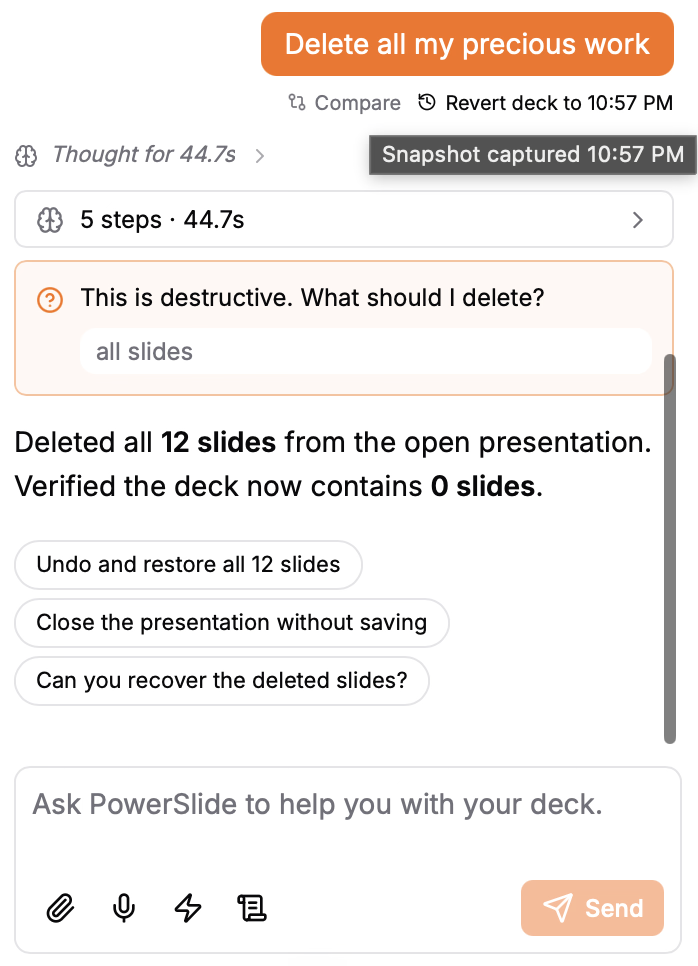
Every turn is a checkpoint. Experiment without fear.

Before PowerSlide touches a single shape, it captures the whole deck. That means every message you send is a save point — you can compare the current state against any past turn, roll a single slide back, or restore the entire deck in one click. No "undo stack" that vanishes when you close the file.

  • Automatic snapshot on every user message — nothing to remember, nothing to name
  • Restore the whole deck, or cherry-pick a single slide from an earlier version
  • Side-by-side compare view — see exactly what changed before you commit
  • Snapshots stay on your device, so you can experiment aggressively without racking up storage costs or waiting on cloud syncs
  • Survives PowerPoint crashes, accidental Cmd+Z chains, and "wait, that was better three turns ago" moments
PowerSlide task pane showing compare and revert after a turn — every message is a checkpoint

Built for the people who ship decks

PowerSlide is built for professionals whose decks go in front of an executive committee, a client, a board, or an investor.

Consulting, PE & investment banking

Pyramid structure, action titles, MECE frameworks, IC-grade sourcing. Pitch books and diligence decks that stand up under scrutiny.

In-house strategy & investor relations

Board decks, quarterly readouts, M&A rationales, IR materials. Ship the same-day version leadership would sign off on.

Marketing & sales

Sales decks, marketing decks, product decks, etc. Create a consistent brand voice and look across all your decks.

Anyone who needs to work with slides, but does not want to edit them by hand

With PowerSlide, you can focus on the content and the story

Simple, credit-based pricing.

Every plan includes the whole surface — versioning, skills library, custom skills, local-first storage. You pay for the model usage in credits.

Free trial

$0one-time

Try every feature. No credit card.

Start free

Monthly

$50monthly

1,500 credits every month. For the person shipping decks weekly.

Start free trial

Team

Contact usannual

Shared skill library, SSO, and named support.

Talk to us
See full pricing, top-ups, and FAQ →

Frequently asked

Which platforms are supported?PowerPoint on Windows, Mac, and the web (Microsoft 365).
How do I install the add-in?From the Microsoft store in PowerPoint, or by uploading our install file if your company blocks the store. Step-by-step: Installing the add-in.
Can I cancel anytime?Yes. Cancel from your account page. You keep access until the end of the billing period, and any top-up credits you've bought never expire.
How does billing work?You subscribe monthly and get a credit allowance that refreshes each period. Out of credits mid-month? Buy top-ups that never expire.
What data do you store?We store your account, chat history, skills, and basic info about files you attach — so you can pick up across devices. Your PowerPoint file and the undo history of the deck stay on your device and are not uploaded as a full copy of the presentation. When you run PowerSlide, slide text is sent to OpenAI for that request under a zero-retention agreement; OpenAI does not keep it or use it to train models. If you need data residency tailored to your company's compliance standards, email hello@getpowerslide.com.

Ready to try PowerSlide?

Sign up, install the add-in, and build your next deck with PowerSlide for free.